Apple's On-Device Model Has a 4,096-Token Window, and Your App Spends It Faster Than You Think
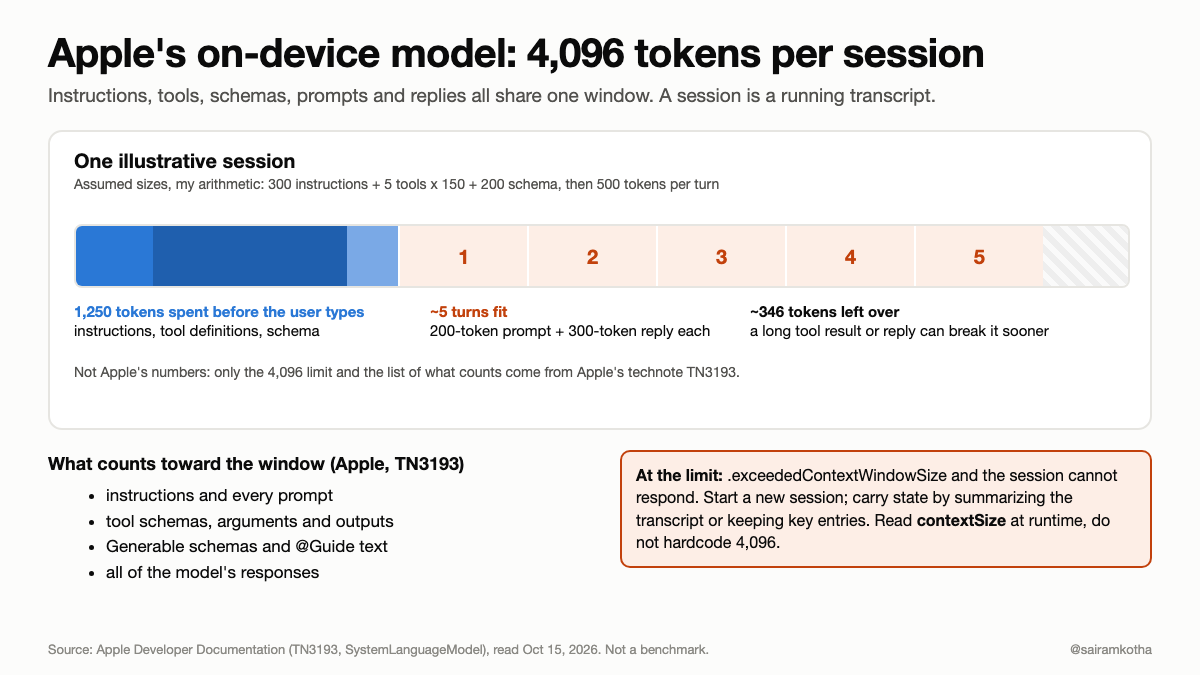
Apple's on-device model is free, private and fast. It also has a context window of 4,096 tokens, and that window is shared by more things than most developers count. A chat feature that works in a demo can run out of room within a handful of turns once real instructions, tools and structured output are added.
This article follows Apple's own documentation: what the window is, what spends it, a worked budget, what Apple recommends, and what to do when you hit it.
How to read it: every claim about the Foundation Models framework comes from Apple's documentation, read on October 15, 2026, mainly technote TN3193 and the API pages for SystemLanguageModel. The budget example uses sizes I assumed, and the code is a sketch I have not compiled. Where Apple's pages were silent, I say so.
The number
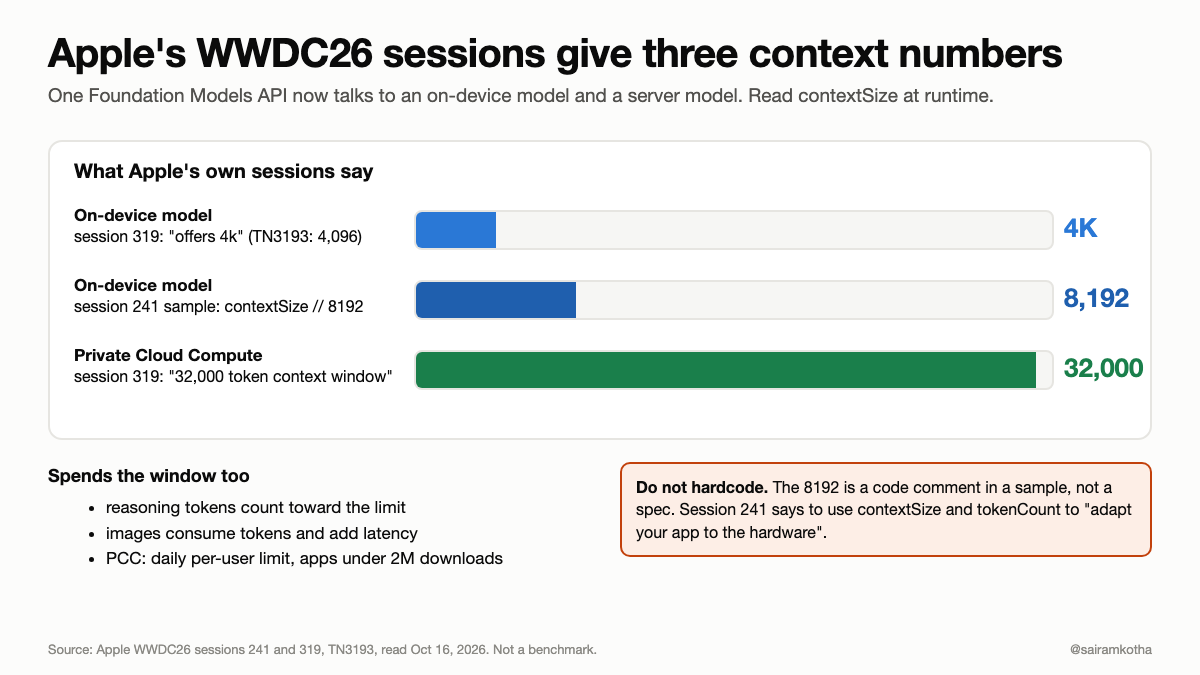
TN3193 states it plainly: Apple's on-device foundation model has a context window of 4096 tokens per language model session. Apple explains the reason too: an on-device model running on an iPhone needs a relatively small window to run efficiently.
Two details matter:
- It is per session, not per message. The
contextSizedocumentation says it is the total number of tokens that can be used in a single session, including both input prompts and generated responses. - Tokens are small. Apple says a token is roughly three to four characters in Latin-alphabet languages like English, and roughly one character per token in Chinese, Japanese and Korean.
My arithmetic: 4,096 tokens at 3 to 4 characters is about 12,000 to 16,000 English characters. That is a few pages of text for the whole conversation, instructions and replies included. For Chinese, Japanese or Korean it is closer to 4,000 characters.
What spends the window
The technote lists everything that contributes tokens to the current session:
- Your instructions.
- Every prompt you send.
- Tool information: the schemas, the arguments the model passes, and the tool's output.
- Your
Generableschemas. - All of the model's responses.
Two of these are easy to miss. For every Generable type, the framework converts its type and format information into a JSON schema and passes that text to the model, and any @Guide descriptions you write also cost tokens. For tools, the name, description and parameters go into the prompt, and each tool call's output comes back in as more tokens.
The consequence is that a session is a running transcript. Each turn adds your prompt and the model's reply, and nothing leaves until you start a new session.
A worked budget
These sizes are my assumptions, chosen to be plausible for a small feature, not measurements:
- Instructions: 300 tokens.
- Five tools at about 150 tokens each for name, description and parameters: 750 tokens.
- One
Generabletype with a few@Guidenotes: 200 tokens.
That is 1,250 tokens spent before the user says anything, leaving 2,846. If a turn is a 200-token prompt and a 300-token reply, that is 500 tokens per turn, so the chat has room for about five turns. If a tool returns a long result, fewer.
Your numbers will differ. The point is the shape: a fixed overhead you pay once, then a per-turn cost that adds up, in a window small enough that the overhead is a third of it.
What Apple tells you to do
TN3193 is written as a diet. Its advice, in my grouping:
- Measure first. Use
tokenCount(for:)on your instructions, prompts, tools, schema and transcript entries, and use the Foundation Models instrument in Xcode to watch token use while the app runs. - Split big tasks. Run each step in a new session and assemble the results. For a long article, summarize each chunk in its own session and pass the previous summary forward.
- Ask for less. Put the target length in the prompt ("In 3 sentences...") and cap array sizes with
@Guideand a maximum count. - Shrink prompts. Aim for one to three paragraphs, use concise imperative language, and give the model only the information the task needs.
- Keep types small. Short property names, and add
@Guideonly where the model needs help. - Limit tools. Keep tool and
@Guidedescriptions to a short phrase and give the model a maximum of three to five tools. If the model should always have a tool's data, run the tool yourself first and put the result in the prompt. - Use retrieval. For large knowledge bases, fetch only the relevant snippets instead of loading everything.
One warning stands out. Apple says to use maximumResponseTokens only to protect against runaway generation, because a strict cap can make the model produce malformed or grammatically incorrect partial output, like "A cat is a small."
When you hit the limit
The framework throws .exceededContextWindowSize, and the session cannot respond. A new session has a fresh window but not the old state. Apple's options are to summarize the old transcript into a new session, or keep only the important entries. Its example keeps the first and last:
func newContextualSession(with original: LanguageModelSession) -> LanguageModelSession {
    let all = original.transcript
    let condensed = [all.first, all.last].compactMap { $0 }
    var newSession = LanguageModelSession(transcript: Transcript(entries: condensed))
    newSession.prewarm()
    return newSession
}
That example is Apple's, lightly shortened. Keeping the first and last entry is a starting point, not a quality guarantee, so test what your feature actually loses.
Do not hardcode 4,096
Apple added two APIs for this. SystemLanguageModel.contextSize returns the maximum context size in tokens that the model supports, and tokenCount(for:) returns the token count for your input. Apple's contextSize page marks it as back-deployed before iOS 26.4, and its tokenCount(for:) page lists availability from iOS 26.4. InfoQ's write-up says both additions are back-deployed, so check the availability on your deployment target. InfoQ's reading is that the point is to remove the need to hardcode the limit.
There is a reason beyond tidiness. The SystemLanguageModel page says Apple periodically updates the model in routine OS updates, and currently lists three model versions: iOS, iPadOS, macOS and visionOS 26.0 to 26.3, 26.4, and 27.0. Apple's guidance is to test your prompts against old and new versions and to version them with #available checks. The technote documents 4,096 for the model it describes, and I did not find a documented window for the 27.0 model. Read the limit at runtime and re-measure after each OS update.
let model = SystemLanguageModel.default
let limit = try model.contextSize
let instructionTokens = try await model.tokenCount(for: instructions)
A pattern I would use
This section is my opinion, not Apple's.
- Budget at launch. Count the tokens of your instructions, tools and schemas once, and compute how much is left for conversation.
- Keep a reserve. Do not plan to fill the window. Leave room for a long reply.
- One task, one session. Start a new session for each distinct job instead of one forever chat.
- Decide the overflow behavior in advance. Summarize, trim, or hand the task to a server model. Do not let the error be the first time you think about it.
- Re-test on each OS release. Prompts and limits can change with the model version.
What I could not verify
I did not run any of this on a device, so the budget example and the code are untested illustrations. I did not find a documented context window for the iOS 27.0 model, so I make no claim about it. Reports about newer Apple models describe input limits as undisclosed, and I did not use them. Apple's token-per-character figure is a rule of thumb, so measure your real strings. Device and region availability, and model behavior, vary and change.
Sources, accessed October 15, 2026: Apple Developer Documentation: TN3193, "Managing the on-device foundation model's context window"; SystemLanguageModel; contextSize; tokenCount(for:); "Updating prompts for new model versions" (developer.apple.com). InfoQ, "Apple Foundation Models context" (infoq.com, March 2026).
If your on-device feature kept a conversation going for ten minutes, do you know how many tokens it would have left?
#iOS #AI #OnDeviceAI #Swift
Work with me: I take 1:1 calls on mobile architecture reviews, mobile and AI questions, and startup tech consults. Book a slot on Topmate: topmate.io/sairamkotha