Automating Mobile App Testing with AI: From Test Cases to Screenshot Feedback
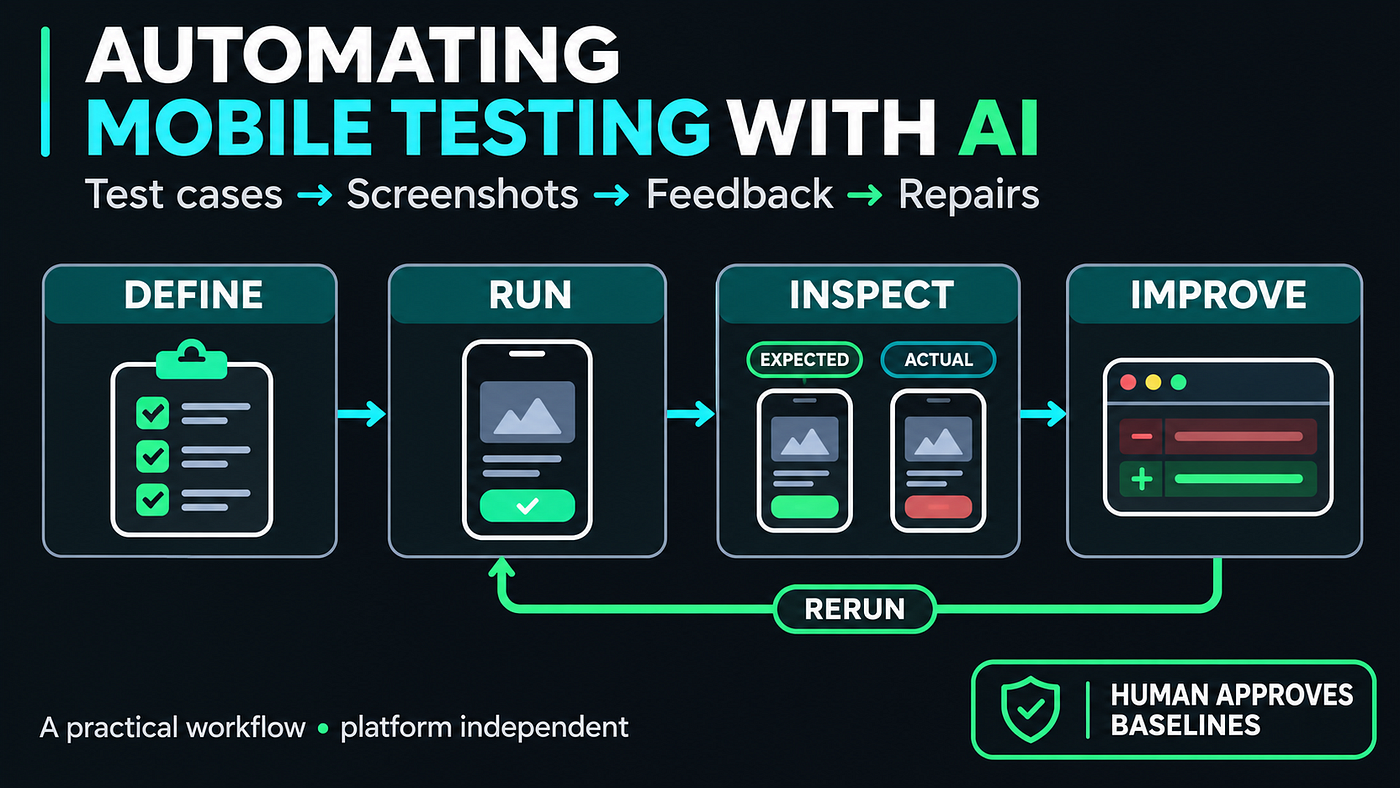
Use AI to define scenarios, generate automation, investigate screenshot differences, and propose repairs, with evidence at every step.
This article was written with AI assistance. The checkout examples are illustrative; linked sources document the tool capabilities.
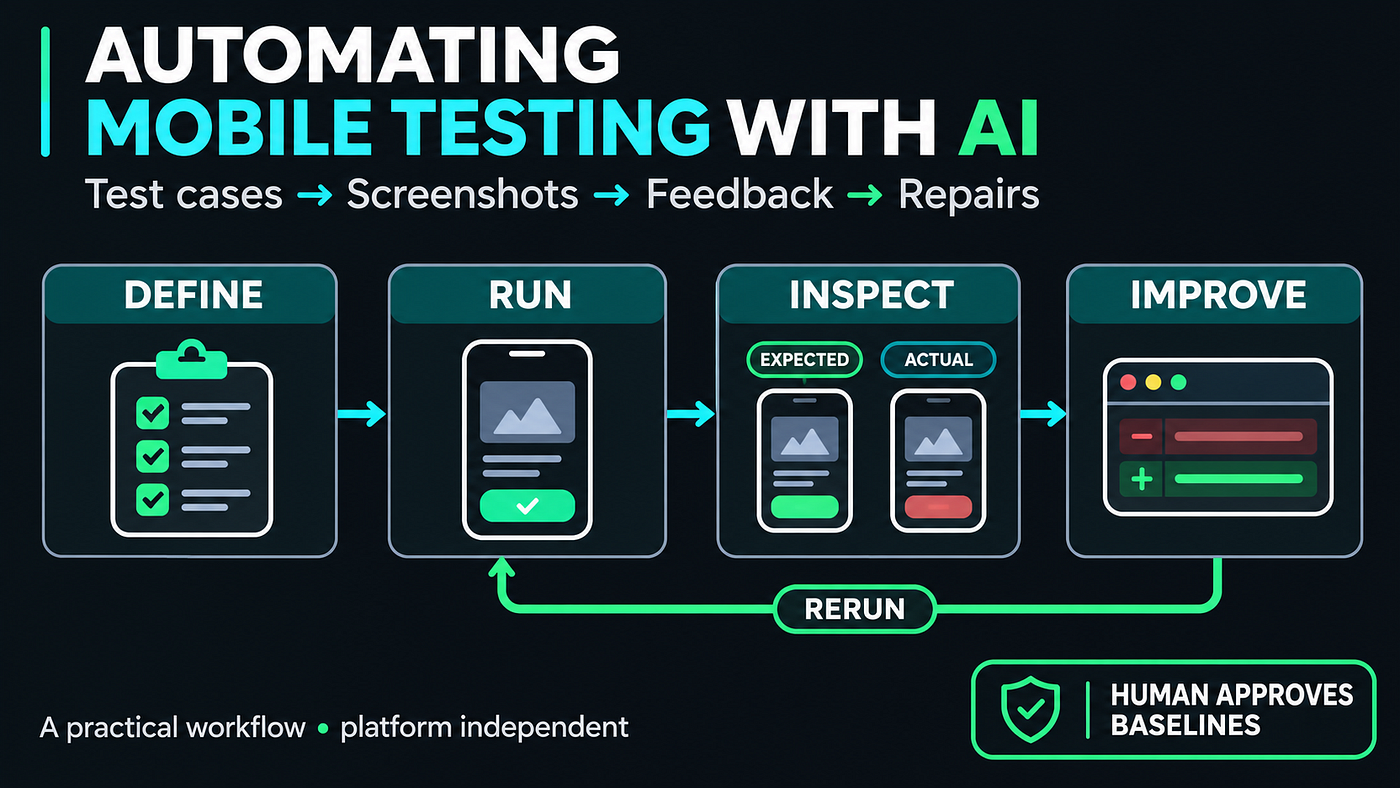
The short version. AI can now write a feature, generate its tests, and look at screenshots of the result. Connect those steps and you get a feedback loop that can catch a defect and propose a fix before a person reviews the code. The loop only works if you define what "correct" means first, keep the approved screenshots under human control, and treat the AI's conclusions as evidence to check, not as the final answer.
Who this is for. Mobile developers and testers who want a practical workflow. If you are not an engineer, the first half, up to "Make the test boundary explicit", gives you the whole idea. The second half covers how to run it safely.
Words used below, explained once:
- Test case: a written scenario with a starting point, actions and an expected result.
- Fixture: fixed test data, like a cart with one known item, so every run starts the same.
- Reference image (baseline): a screenshot a person has approved as "this is how it should look".
- Visual regression: the screen looks different from the approved image after a change.
- Agent: an AI that can take steps, such as running tests and editing code, not only answer questions.
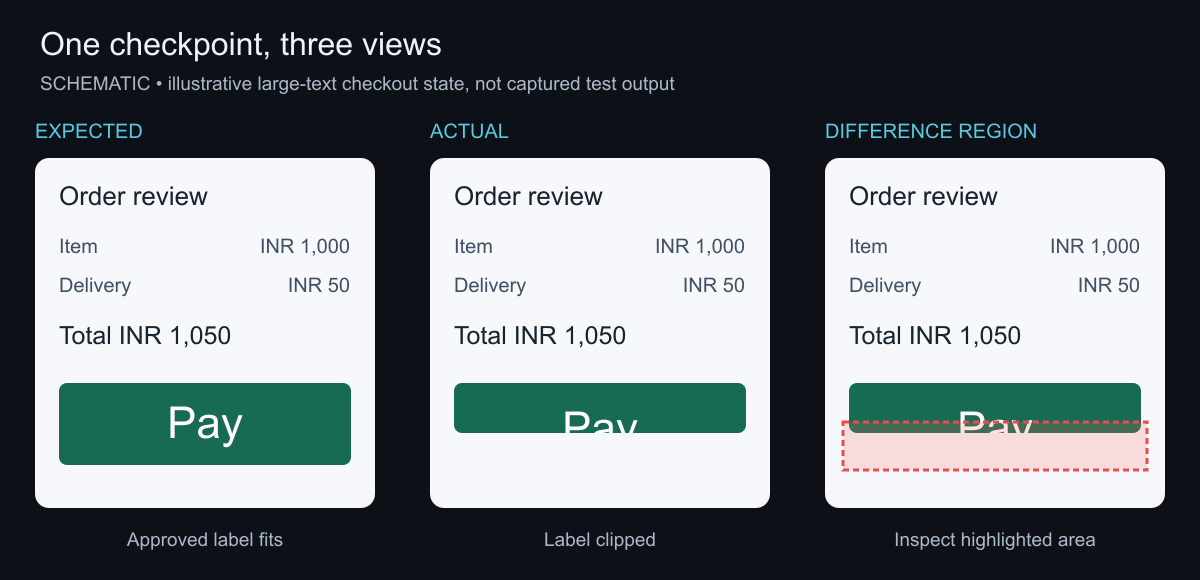
Consider a checkout screen. A layout change leaves the Pay button's label clipped when the user increases their text size. The payment action still works, so behavioral checks pass. A screenshot comparison flags the changed appearance, and an agent uses the difference image and layout code to propose a repair.
Here is how to build that loop around one checkout flow, from defining success to reviewing the final evidence.
The workflow can remain independent of the app framework. Its core pieces are a test contract, controlled data, an automation runner, reference images, and a reviewable record of what happened.
This article combines documented workflows with an illustrative checkout example. The checkout scenarios and proposed controls below are a design blueprint, not results from an experiment I have run.
What teams can already automate with AI
Several published tools show how the pieces fit together.
Playwright documents three test agents: a planner that explores an application and produces a Markdown plan, a generator that turns the plan into executable tests, and a healer that investigates failing tests. This is a concrete example of separating exploration, test generation, and maintenance. See Playwright Test Agents.
Anthropic describes a visual development loop: give the agent a target image, let it implement the interface, capture the rendered result, and iterate. Screenshots give the agent feedback that compiler output alone cannot provide. See Claude Code best practices.
Maestro offers natural-language visual assertions. It captures a screenshot and asks a model whether a statement about the screen is true. Its documentation calls the feature experimental and makes these assertions non-blocking by default because AI responses can be unstable. That is a useful distinction: an AI assessment is another source of evidence whose reliability needs evaluation. See Maestro assertWithAI.
Start with a test contract
"Test the checkout screen" leaves most of the important decisions unstated.
What should happen after payment succeeds? What if the connection disappears? Can a person accidentally place the same order twice? Should a failed payment leave the cart intact?
A useful test case answers five questions:
- What state does the test start in?
- What data does it use?
- What actions does the user perform?
- What observable outcome proves success?
- Which checkpoints need visual inspection?
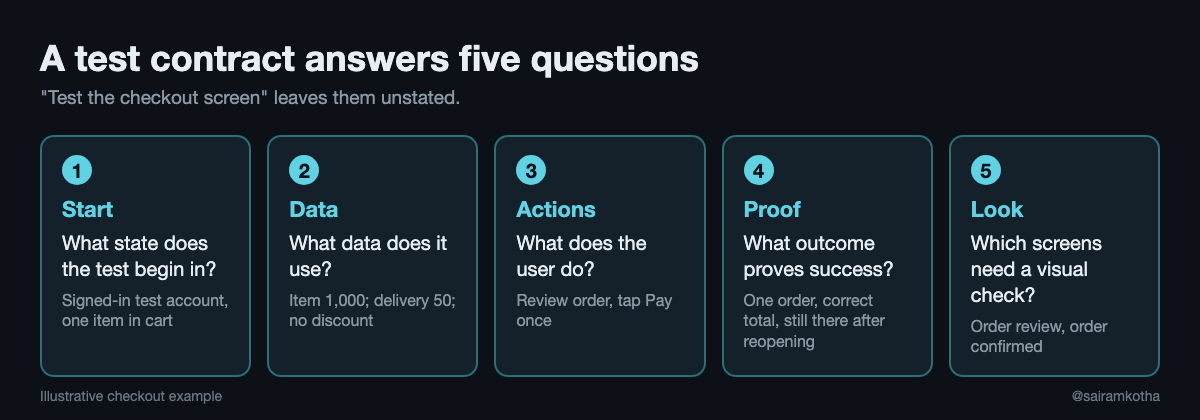
For example:
| Part | Checkout example |
|---|---|
| Starting state | Signed-in test account, one item in cart |
| Fixture | Item ₹1,000; delivery ₹50; no discount |
| Action | Review order, then tap Pay once |
| Expected outcome | One order created; confirmation displays ₹1,050 |
| Persistence | Order remains visible after reopening order history |
| Visual checkpoints | Review screen and confirmation screen |
Notice that "confirmation screen appears" is only part of success. The backend must contain one order, the amount must be correct, and the result must survive navigation or reopening.
AI can help expand this contract into additional cases. Ask it to consider empty data, retries, interrupted requests, rapid repeated actions, long text, and accessibility settings. Then review its proposals against the product requirements.
Exploring the current app is useful for learning how to operate it. Requirements must still define what it should do; otherwise, a generated test can preserve an existing defect. Review the expected outcomes independently of the implementation. A second agent can suggest missing cases, but agreement between agents is not proof that the requirements are correct.
Here is a compact, framework-independent representation:
id: checkout-success
requirement: A successful payment creates exactly one order.
setup:
  account: isolated-account-for-this-run
  fixture: cart-single-item-v1
  orderService: isolated-test-backend
  paymentProvider: sandbox-success
  clock: "2026-11-09T10:00:00Z"
steps:
  - Open the order review screen.
  - Tap Pay once.
  - Wait for the order confirmation state.
expected:
  - Confirmation displays a total of INR 1050.00.
  - The test backend contains exactly one order for this checkout attempt.
  - Order history contains the order after reopening.
visualCheckpoints:
  - order-review
  - order-confirmed
An agent can translate this into the team's existing test framework. The contract remains readable during review, and each generated test should identify the requirement and scenario it covers.
Make the test boundary explicit
Use two executions of this scenario for different purposes:
- UI execution: simulate service responses to render known states quickly and consistently. Check the total, button state, and screenshots. This does not establish that the real order service saved anything.
- Integration execution: use an isolated test backend and a payment sandbox or controlled payment adapter. Exercise the actual order-creation path, verify the order through a separate backend query, then reopen order history. This verifies the tested integration boundary; it does not prove live payment-provider behavior.
Give each run its own account or data namespace and checkout identifier. Create its fixtures before execution and clean them up afterward. A leftover order from a previous run must not satisfy today's assertion. For repeated-tap and retry cases, query orders for the same checkout attempt to detect duplicates.
Give different checks different jobs
The word "snapshot" can describe several different artifacts. A screenshot records rendered pixels. A structural snapshot records a UI or accessibility tree. A data snapshot records serialized values. They answer different questions.
For this workflow, screenshot testing compares a rendered screen with a previously approved reference image. It is useful for unexpected layout, typography, spacing, and visibility changes.
Behavior tests verify outcomes: the correct amount, the number of orders, whether retry succeeds, and whether saved state persists. Accessibility checks add evidence about labels, roles, focus, and other supported properties.
AI can also inspect a screen for issues that were not expressed as exact assertions. Treat those observations as findings to investigate, then turn confirmed recurring defects into repeatable tests where practical.
Consider three defects we could deliberately introduce:
| Defect | Check that catches it |
|---|---|
| Pay button is clipped at a large font size | Screenshot comparison for that state and font size |
| Confirmation looks correct, but no order was saved | Persistence or backend assertion |
| Two fast taps create duplicate orders | Interaction test plus order-count assertion |
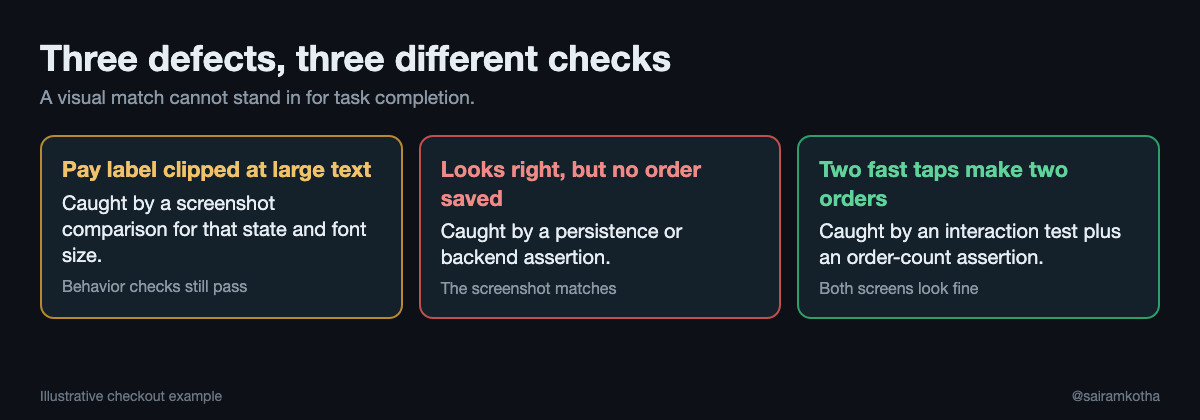
This is why a visual match cannot stand in for task completion. VISTA, a research benchmark for applications built from visual specifications, evaluates component localization and behavior separately. Its results illustrate that those capabilities can diverge. The benchmark does not predict a particular team's defect rate. See the VISTA research paper.
Build and review the reference images
A reference image is a versioned statement of accepted appearance.
For an existing feature, capture it from a reviewed build. For a new feature, render the candidate implementation and review it against the design and requirements before approving it. A stable first screenshot can still contain a mistake.
Identify each reference by scenario, checkpoint, and rendering configuration. Keep enough metadata to reproduce the image:
testing/
  contracts/checkout-success.yaml
  fixtures/cart-single-item-v1.json
  references/
    checkout-success/
      compact-light-en-IN-default-font/
        order-review.png
        order-confirmed.png
        manifest.json
The manifest can record the approved app revision, fixture version, screen dimensions, locale, theme, font scale, rendering environment, and approval reference. Extend the configuration key when distinct environments produce different rendering.
Store modest reference sets in Git for image review and history. Larger suites may use Git LFS or a visual testing service. An external store should provide immutable versions and an audit trail of approvals; a mutable "latest" image makes historical comparisons ambiguous.
Keep run artifacts separate from approved references. A failed run should preserve the expected image, actual image, difference image, test logs, and execution trace when available. Retain failures long enough for triage under the team's artifact policy.
Keep baseline updates reviewable across branches
Record the exact baseline version used for every run. One policy is to compare a proposed change against the approved references from a pinned revision of its target branch. Proposed replacements travel with the change, while the comparison continues to use the trusted reference set.
For an intentional redesign, show the old image, proposed replacement, and reason for the change together. After approval and merge, publish a new baseline version. If the target branch changes before merge, rerun against its current approved references.
When two branches change the same screen, resolve the intended combined appearance and capture it again. Reusing either branch's image without checking the merged screen can approve an appearance the combined code never renders. Preserve previous versions and their approval records.
Make captures repeatable
Before asking AI to explain a difference, reduce accidental differences.
Use controlled accounts and fixtures, a fixed clock where relevant, and a defined locale, theme, and font scale. Pin the rendering environment. Wait for explicit application readiness and handle animations consistently.
Playwright's visual comparison documentation specifically recommends running comparisons in the same environment used to produce the reference screenshots. The broader lesson applies across screenshot tools: environment drift can produce image differences without a product regression. See Playwright visual comparisons.
Mask regions only when their changing content is irrelevant to the assertion. Hiding the order total to avoid a noisy comparison also removes evidence about a value the test is meant to protect.
Choose how visual differences are judged
| Method | What it shows | Watch for |
|---|---|---|
| Pixel comparison | Where rendered pixels differ from the reference | Font rendering and other harmless differences can create noise |
| Perceptual comparison | Differences judged significant under a tool's visual similarity rules | Sensitivity and ignored regions depend on the tool and configuration |
| LLM assessment | Whether a screenshot appears to satisfy a natural-language criterion | Responses can vary; evaluate against known good and bad examples |
Set tolerances using representative defects and unchanged renders. Check that the comparison still detects a clipped label or missing control. Increasing the allowed difference until a failing build passes can conceal the defect you intended to catch.
These methods can complement explicit behavior assertions. A model's explanation of a screenshot difference is useful triage evidence, not a substitute for the comparison result or the underlying requirement.
Connect the AI testing loop
The complete workflow looks like this:
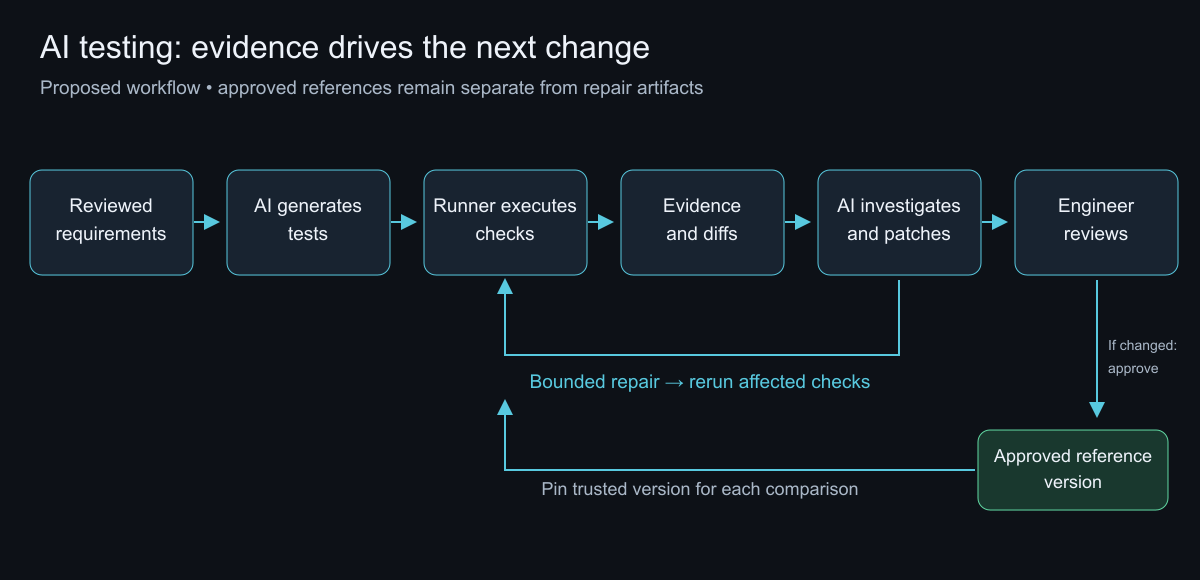
On a clean run, the normal test runner executes committed tests without requiring a model to interpret every result. Bring AI into scenario development, exploratory checks, and failure investigation where its reasoning is useful. This is a proposed operating model, not a requirement of the tools above.
For each failure, give the agent a focused evidence bundle: the test contract, failing step, fixture identifier, build revision, expected and actual images, difference regions, and relevant logs. Ask it to explain the failure before editing.
A practical investigation prompt could be:
Investigate checkout-success at order-confirmed.
Use the attached contract, screenshots, trace, and logs.
Classify the failure as an implementation defect, test defect,
environment problem, or proposed intentional change.
Explain the evidence, propose the smallest correction, and run
the affected checks. If evidence is insufficient, report that.
Do not weaken assertions, skip cases, change comparison thresholds,
or update approved reference images without separate review.
Enforce those boundaries through the surrounding workflow. A prompt alone cannot protect references. CI (the automated build system) can compare against trusted baseline versions and flag changes to assertions, skips, thresholds, fixtures, and reference images for designated review.
Bound the repair loop too. For example, allow two repair attempts before returning an unresolved report. Two is an illustrative policy choice; tune the budget using observed repair success, cost, and review burden.
Follow one visual failure through the loop
Return to the clipped Pay label. Add a large-text variant of the checkout contract with its own approved reference. Keep the cart fixture, screen size, theme, and rendering environment fixed.
The following sequence is illustrative, not a captured execution:
- Capture: the runner opens order review, waits for the expected total and enabled Pay button, then captures the screen at the configured text size.
- Compare: the visual check flags a difference around the button label. The approved image shows the full label; the current render clips its bottom edge.
- Investigate: the agent inspects both images, the difference region, and the layout code. Suppose it finds a fixed button height that cannot accommodate the larger text. That is a proposed diagnosis to validate.
- Repair: the agent changes the button to support content-driven height while retaining required padding and minimum touch area. It leaves the reference and comparison settings untouched.
- Rerun: the runner repeats the large-text capture and the button's interaction checks, then checks the default-text variant for adjacent regressions. Any remaining visual difference still needs investigation.
- Review: the engineer examines the patch and artifacts. If the repaired render satisfies the existing comparison, no new reference is needed. An intentional appearance change follows the baseline approval path instead.
A report for a successful repair might look like this:
ILLUSTRATIVE REPORT - NOT AN EXECUTED RESULT
Scenario: checkout-success / large text
Checkpoint: order-review
Baseline: approved-reference-version-17
Behavior checks before repair: PASS
Visual comparison before repair: FAIL
Finding: Pay label clipped
Proposed change: allow button height to grow with content
Reference / threshold / assertion changes: NONE
Repair attempts: 1
Visual and behavior checks after repair: PASS
Default-text regression checks: PASS
Skipped cases: 0
Review status: AWAITING ENGINEER REVIEW
Artifacts: expected.png, actual.png, diff.png, trace, test logs
The report identifies what failed, what changed, which checks ran again, and what remains pending. Keep the initial failure artifacts alongside the repaired run so reviewers can inspect the full sequence.
Review what "healed" actually means
Test maintenance and product repair are different outcomes.
A locator may need updating after an intentional label change. A payment action that stopped creating orders needs a product fix. Both can begin with a failing test, so the report should show which changed.
Playwright's healer documentation says its output can be a passing test or a skipped test when it believes functionality is broken. A pipeline therefore needs to expose skipped cases alongside passes and failures.
For visual reviews, Applitools documents agents inspecting failures and proposing resolutions, with explicit approval before changes are committed to the baseline. Its inspection tools operate on existing results across SDKs, while its setup tools have narrower support. The transferable principle is separating investigation from baseline approval. See Applitools MCP.
Measure the loop before expanding it
Start with one feature and a small set of reviewed scenarios. Introduce known defects, then record what each layer catches.
Measure detection rate against those known defects, false alarms on unchanged builds, missed defects, repair attempts, unresolved cases, execution cost, and human review time. Repeat AI-based judgments to see whether the same evidence produces consistent decisions.
Also record changes to the tests themselves. A rising pass rate means less when assertions are disappearing or references are being replaced.
For mobile products, include at least one lifecycle scenario: interrupt a request, leave the screen, and return. A screenshot can capture the resulting state, while behavioral assertions establish whether stale data, duplicate actions, or lost progress caused it.
Try the review yourself
Imagine a report with three facts:
- Confirmation screenshot matches the approved reference.
- Confirmation displays the expected order total.
- Reopening order history shows no new order.
Would you approve the feature?
The visual checks succeeded. The persistence requirement failed. The next useful action is to investigate the missing order and preserve that requirement in the repair.
That is the opportunity in AI-assisted automation: connect requirements, repeatable execution, visual evidence, and focused repair. Let the agent do more of the work, while making its conclusions easier to inspect.
Questions people ask
Can AI replace my existing mobile test suite?
No. The workflow keeps your normal test runner for committed tests. AI helps write scenarios, investigate failures and propose repairs, and a person reviews the result.
What is the difference between a screenshot test and a behavior test?
A screenshot test checks how a screen looks against an approved image. A behavior test checks what the app does, such as how many orders were created. A screen can look right while the behavior is wrong, so you need both.
Who should approve a changed reference image?
A person. The article's rule is that an agent can investigate and propose, but updates to approved references go through separate review.
Why not let the AI judge every screenshot?
Its answers can vary. Maestro, for example, documents its AI visual assertions as experimental and non-blocking by default. Treat an AI judgment as evidence and test it against known good and bad examples.
Does this work for both iOS and Android?
The workflow is framework independent. The tools named here have their own platform support, so check each tool's documentation for your stack.
Research checked November 9, 2026. Tool examples describe published capabilities, not an independent comparison or endorsement. The proposed checkout workflow has not been implemented or benchmarked for this article.
Originally published on Medium.
#AIEngineering #TestAutomation #MobileDevelopment #SoftwareTesting #VisualTesting
Work with me: I take 1:1 calls on mobile architecture, on-device vs cloud AI decisions and startup tech consults. Start with a free 10-minute intro call, or book a Mobile Architecture Review. All options: topmate.io/sairamkotha
Comments
Join the discussionNo comments yet. Be the first to comment.