Xcode 27 Moved SimulatorKit, and Taps Can Fail While Screenshots Still Work
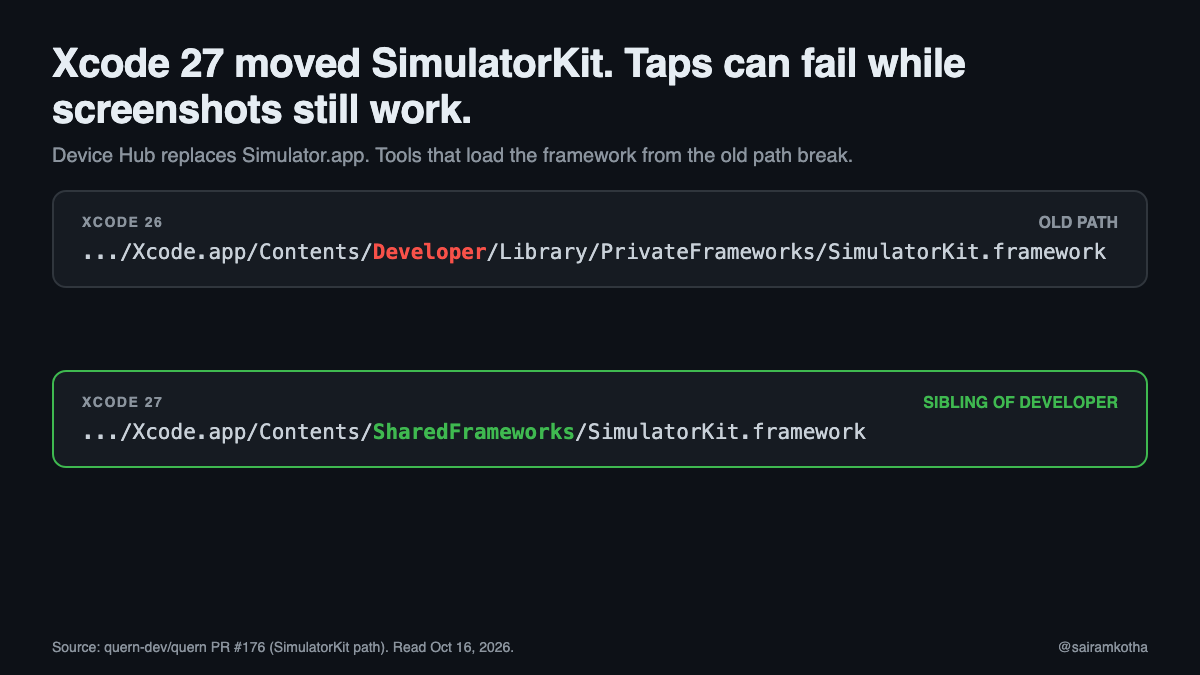
Xcode 27 replaced Simulator.app with Device Hub and moved a private framework that automation tools load. The result is a split failure: some simulator calls still work, and the ones that send input can fail. If your CI drives the simulator, the failure can look like a flaky test rather than a broken path.
This article covers what changed, what breaks, and what I would change in a CI pipeline. I have not run any of this on Xcode 27 myself.
How to read it: the path change, the failing operations and the workarounds come from GitHub issues and a pull request in open-source simulator tools, read on October 16, 2026. I did not watch the video this article is based on, and I could not open its transcript, so I have not used it as a source. Where the sources disagreed, I say so.
What changed
Two things moved.
- The app. Simulator.app is gone. Device Hub replaced it. One reporter found
Contents/Applications/DeviceHub.apppresent andContents/Applications/Simulator.appabsent. - The framework. Tools load
SimulatorKit.frameworkto talk to simulators. In Xcode 26 it lived under the developer directory. In Xcode 27 it moved to a sibling folder:
Xcode 26:  Xcode.app/Contents/Developer/Library/PrivateFrameworks/SimulatorKit.framework
Xcode 27:  Xcode.app/Contents/SharedFrameworks/SimulatorKit.framework
A pull request that patched one tool describes the new location as "a sibling of Developer, not a relocation within it." That detail matters for any path logic that assumes everything sits under Developer.
What breaks
The reports agree on this, with one difference noted below.
- Attaching to a simulator fails with a framework-load error when the tool looks in the old location:
Attempting to load a file at path '/Applications/Xcode 27.app/Contents/Developer/Library/PrivateFrameworks/SimulatorKit.framework', but it does not exist. - Input fails. The same pull request says every simulator HID call (
tap,type,swipe,press) fails when the framework cannot be loaded. - Silent taps. One reporter saw
tapandbuttonreturn success while the screen did not change. - Opening Simulator.
open -a Simulatorfails, because the app is gone. - Builds. If you point
xcode-selectback at an older Xcode to get the old paths, builds that need the Xcode 27 SDK fail.
The reports disagree on screenshots. The pull request says screenshots and app install are unaffected. Another report says video and screenshots gave a black screen and a crash after the path was patched. I would test screenshots on your own runner before trusting either account.
Workarounds that people used
- Pin
xcode-selectto an older Xcode. This fixes attach and input, but breaks builds that need the Xcode 27 SDK. Good for a short fallback, not as a fix. - Symlink the framework into the old layout. This works locally, but it writes into the Xcode bundle and needs sandbox changes in at least one tool. I would not put it in CI.
- Use a physical device. One reporter drove an iPhone over iPhone Mirroring instead.
The pull request's approach is the one I would copy: resolve the framework from both layouts at runtime, and return the path it actually loaded, so the path logic cannot drift from the file that gets used.
What this means for a CI pipeline
This section is my opinion, not the sources'.
Our repository's workflows run on Linux. The Android Maestro job says iOS simulator coverage "needs a macOS runner and is a deliberate follow-up." I did not find a macOS runner in any workflow. The iOS Detox configuration is set up for an iPhone 16 simulator, so iOS simulator tests are most likely run locally or on a separate Mac. If your failing CI runs are on a Mac runner, the fixes below apply directly. If not, tell me where they run.
- Pin the Xcode version explicitly on macOS runners. Do not take whatever Xcode the image defaults to. Log
xcodebuild -versionat the top of every job. - Resolve SimulatorKit from both layouts, and fail fast. A missing framework should stop the job with a clear message, not time out a test run.
- Do not use symlinks or
xcode-selectswaps in CI. They pass one machine and fail on the next image update. - Separate the failures. A test that fails on a tap is an infrastructure failure until proven otherwise. Make the simulator check a step of its own, so a broken path does not look like a broken screen.
A resolver in shell, as an illustration and not compiled:
XCODE_CONTENTS="$(dirname "$(xcode-select -p)")"   # .../Xcode.app/Contents
SIMKIT=""
for p in "$XCODE_CONTENTS/Developer/Library/PrivateFrameworks/SimulatorKit.framework" \
         "$XCODE_CONTENTS/SharedFrameworks/SimulatorKit.framework"; do
  [ -d "$p" ] && SIMKIT="$p" && break
done
[ -n "$SIMKIT" ] || { echo "SimulatorKit not found under $XCODE_CONTENTS"; exit 1; }
echo "SimulatorKit: $SIMKIT"
What I could not verify
- The video's content. I used its title only.
- Detox's behavior on Xcode 27. I did not check whether Detox or its simulator helper uses SimulatorKit, so I cannot say whether our iOS suite is affected.
- Exact paths on later builds. The reports do not say which Xcode 27 builds they were run on, and I found no Apple documentation for Device Hub.
- Whether Apple intends SimulatorKit to stay private. Tools depend on it, so expect it to move again.
Sources, accessed October 16, 2026: quern-dev/quern pull request #176 (SimulatorKit relocation); anthropics/claude-code issue #79991 (Xcode 27 Device Hub); stablyai/orca issue #17587; software-mansion/argent issue #406.
If your simulator tests went green last week and red this week, which step did they fail on: attach, tap, or the screenshot?
#iOS #Xcode #CI #SoftwareEngineering
Work with me: I take 1:1 calls on mobile architecture reviews, mobile and AI questions, and startup tech consults. Book a slot on Topmate: topmate.io/sairamkotha